Why Can't I Download Attachments From Outlook UPDATED
Why Can't I Download Attachments From Outlook
The majority of the users are familiar with the desktop version of MS Outlook only. But, there is an online version of Outlook also that opens in the web browser. It is Outlook Spider web App or Outlook on the Web where the user tin add the Exchange Server account and access it universally. The user needs to open Outlook on the Web and provide a username and password to open the mailbox. In the mailbox, you lot tin can create and receive emails and access the attachment from the received emails besides.
In this commodity, nosotros volition overcome one significant outcome where the attachments from the emails do not open up in the Outlook Web App. If the emails are opening normally, only Outlook Web Apps can't download attachments, then yous should read the following troubleshooting methods-
Open Outlook Web Apps in a different browser
Many times, the user uses several add-ins in the web browser to run diverse tasks. These add-ins can interfere with the functionalities of other services and stop them from working. If you have enabled multiple add-ins in the same browser where you lot are trying to open Outlook Spider web App, and so you lot should either remove add-ins or open Outlook Spider web App in a unlike Internet Browser.
Cheque the file extension of the attachment
Outlook Web App lets you open attachments of multiple types similar audio, video, images, documents, spreadsheets, applications, etc. But there are several extensions that it volition non open up. Following is the listing of blocked attachments –
.aspx, .xml, .wsf, .wsc, .vsw, .vbs, .vss, .tmp, .shs, .sct, .scr, .reg, .pst, .ops, .mst, .msp, .msi, .msc, .mht, .mdb, .mda, .mav, .mau, .mat, .mas, .mar, .maq, .mad, .lnk, jse, .its, internet service provider, .ins, .htc, .hta, .hlp, .csh, .crt, .cpl, .com, .cmd, .chm, .bat, .bas, .asp, .app, .ade, .adp, .vb, .js, etc.
Y'all should check the extension of the attachment and if the extension belongs to the blocked 1, then y'all should enquire the sender to transport the zipper with a different adequate extension.
- Enquire the sender to send the attachment in a zipped folder.
- If the sender cannot transport the email again, then yous tin can forward the e-mail to a dissimilar email account that supports the extension.

Download attachments as zippo
If there are multiple attachments in a post, then y'all can download them collectively as a zip file. It will contain all the attachments in the aforementioned file.
- In the Outlook Web App, open the email with attachments.
- Click the option 'Download All' in the zipper.
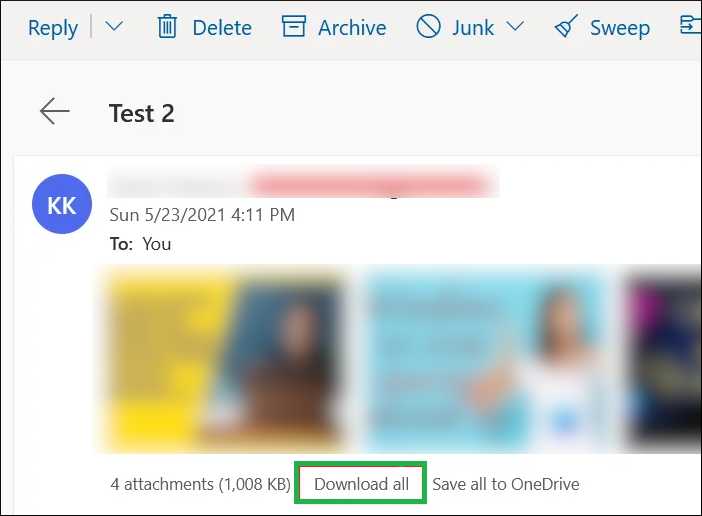
The zip file will download in the default Downloads folder.
Relieve all the attachments in OneDrive
Rather than downloading the attachments to your computer, you lot can directly motility the attachments to your OneDrive for Business account. The attachments volition save in the email zipper folder in the OneDrive and you lot tin open the attachment there.
- Open the email in Outlook Web App.
- To salve a single attachment in OneDrive, y'all tin select the zipper, and using the drib-down option, y'all can choose the 'Save the OneDrive' option.
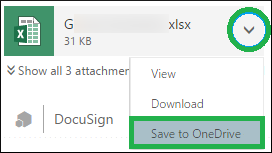
- If there are multiple attachments, then you tin choose the choice to 'Save all to OneDrive.'

- All the attachments volition save in the email zipper binder in OneDrive for Business organization business relationship.
- After saving the attachments in OneDrive, the status will show every bit 'Saved to Email Attachments.'

Use the lighter version of Outlook Web App
Microsoft has deployed a lighter version of the Outlook Spider web App for users who are using lower bandwidth connections, older web browsers like Internet Explorer, and lower RAM or processing units. If the traditional Outlook Spider web App is not downloading attachments, then a light version may assistance you in opening them.
- Click Setting using gear-icon, then click Mail service.
- In the Outlook category, click the checkbox for 'Use the light version of Outlook Web App.'
- Sign-out of the account, so sign in over again in the business relationship.
- Open the emails with attachments and try to open them.
Add the sender as a safe sender
Outlook Web App has a special feature where it can block the suspicious senders who transport fishy or promotional emails. If your sender has been added to such a list, then you cannot download attachments from them. You should add such senders in a safe sender listing then that emails and attachments are not blocked.
- Open Outlook Spider web App and click the gear icon, and then Options.
- Get to Filters and Reporting and under the 'safe sender and domains' section use the Add option to input email accost. Then select show attachments, pictures, and links for senders with good reputations.
- Click Save to apply the changes.
Conclusion
Outlook Web App lets you connect the Commutation Server account in an online manner and when the attachments practice not open, and then you lot tin employ the higher up-mentioned methods. If you are using a traditional Outlook application and it does not open attachments easily, and so it could be a symptom of corrupt data files. You tin use Outlook Repair software to browse data files and recover mailboxes.
DOWNLOAD HERE
Posted by: westmestans.blogspot.com

Post a Comment for "Why Can't I Download Attachments From Outlook UPDATED"